OrchestratoR™
AI Accessibility Copilot for Product Teams
Version 1: MVP Case Study
Note: This case study documents the MVP phase of OrchestratoR™. A future update — User Validation Findings — will be added once usability testing with developers and accessibility specialists is complete.
View the full OrchestratoR™ deck →
Overview
OrchestratoR™ is an AI-powered accessibility copilot designed to help product teams detect, fix, and ship more accessible digital experiences earlier in the development workflow.
The MVP focuses on a thin-slice use case: evaluating a React button component for accessibility issues. The system reviews the component against accessibility rules, design-system tokens, component structure, and WCAG-related criteria, then generates an Accessibility Health Score, supporting findings, and recommended fixes.
The goal was to validate the smallest testable workflow before expanding OrchestratoR™ into a broader accessibility platform for developers, designers, QA teams, and accessibility specialists.
The Problem
Accessibility issues are often discovered too late in the product development process.
By the time accessibility problems reach QA, legal review, or production, they are more expensive and time-consuming to fix. Developers may not always have clear accessibility guidance while they are actively building components, and product teams often lack a shared workflow for catching issues earlier.
This creates several problems:
- Accessibility feedback happens too late.
- Developers may not know what needs to be fixed.
- Design-system tokens can drift from accessibility standards.
- Product teams lose time moving between design, development, QA, and accessibility review, creating bottlenecks and communication breakdowns.
- Companies increase their risk of shipping inaccessible experiences.
- Organizations may face legal exposure, compliance risk, and potential accessibility-related lawsuits.
Product Workflow Today
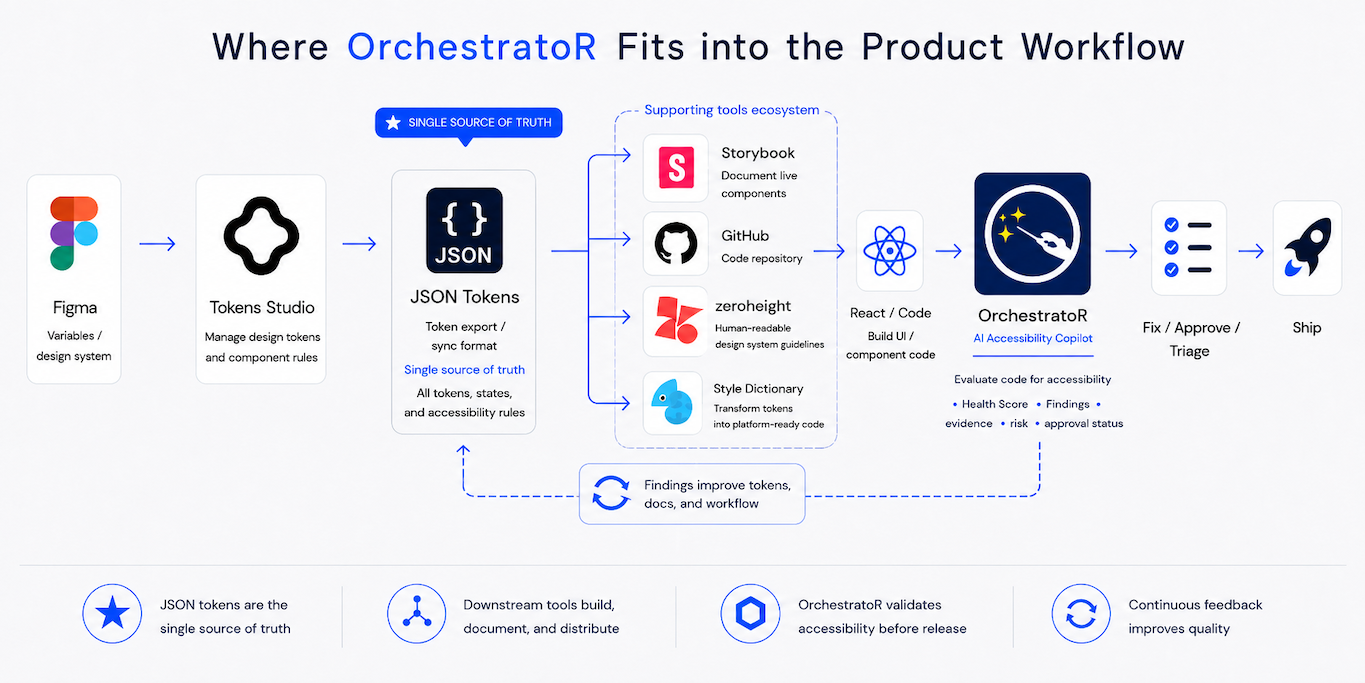
OrchestratoR sits after the design and token workflow, between coded React components and release, as an AI accessibility validation layer. It helps teams detect issues earlier, validate findings, and reduce avoidable rework before handoff or ship.
Tomorrow's AI Workflow
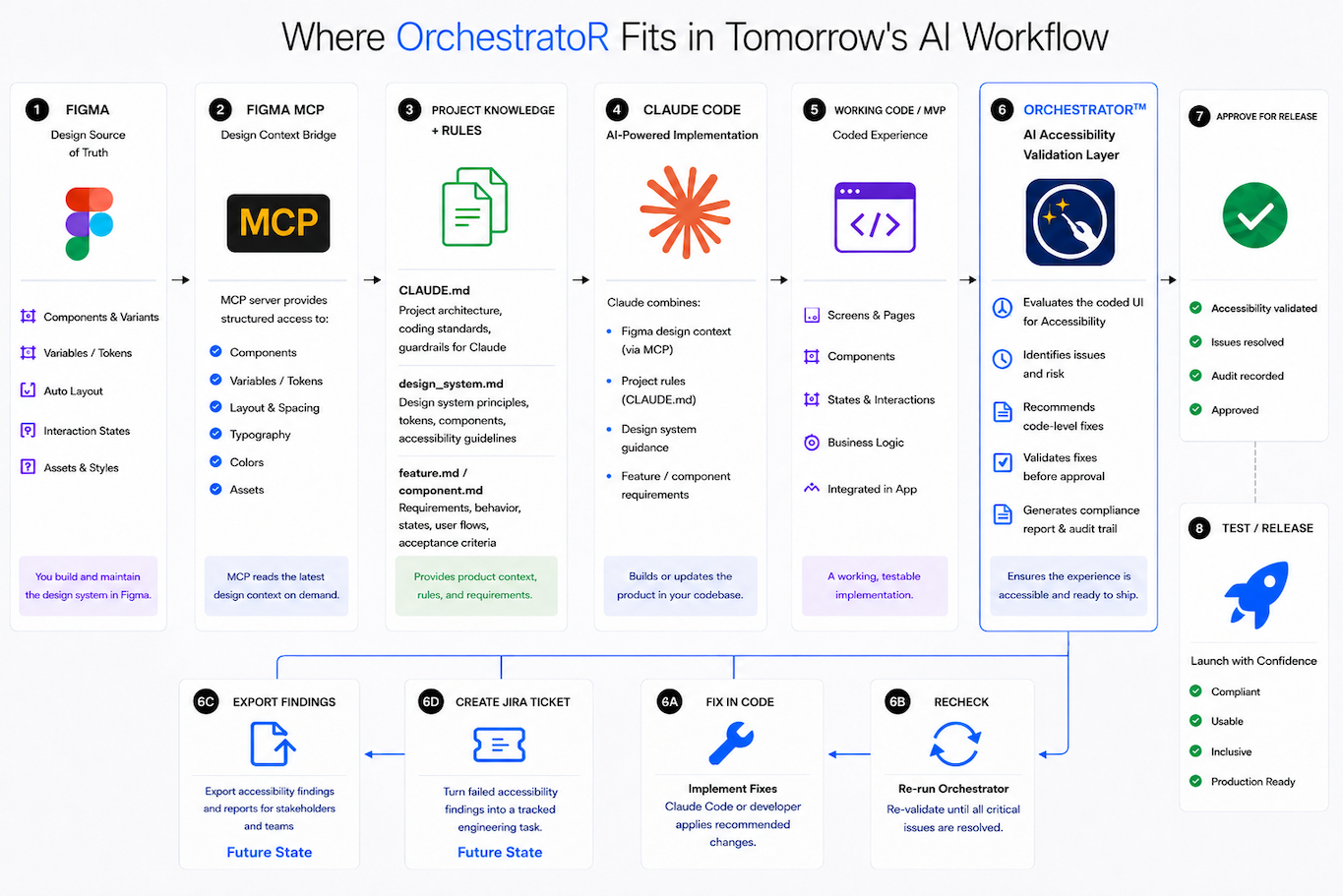
As product workflows are redefined by AI, one question gets left behind: who checks the experience before it ships? As this workflow shows, that's where OrchestratoR fits, between AI-assisted implementation and release. Figma and Figma MCP provide structured design context, project documentation guides Claude Code, and OrchestratoR evaluates the coded experience for accessibility before approval. From there, findings can be fixed and rechecked in a validation loop, with export and tracked Jira work as the next step toward a fully closed, AI-driven quality pipeline.
The Opportunity
The opportunity was to bring accessibility intelligence directly into the development workflow.
Instead of waiting until the end of the process, OrchestratoR™ helps developers identify accessibility concerns while they are still working on the component. The product is designed to act as a copilot that not only flags issues, but also explains what is wrong, why it matters, and how to fix it.
The core hypothesis: If accessibility feedback is provided earlier in the development workflow, product teams can reduce remediation effort, improve accessibility quality, and ship more confidently.
To validate that hypothesis, I designed OrchestratoR™ around a simple before-and-after shift in how accessibility review actually happens on most teams today:
My Role
I created, designed, architected, and AI-assisted coded the OrchestratoR™ MVP.
My responsibilities included:
- Product strategy
- UX design
- AI workflow design
- Accessibility logic
- Front-end prototyping
- Back-end architecture
- Prompt engineering
- RAG-supported guidance
- Claude API integration
- Human-in-the-loop review flow
- Technical diagrams and system documentation
- Product storytelling for portfolio and presentation use
Process
1. Discover the Problem
I started by identifying a real workflow gap in accessibility review. Many product teams want to build accessible products, but accessibility checks often happen after components are already designed, developed, or shipped.
This creates rework and slows teams down.
The problem was not just whether a component passed or failed. The bigger challenge was helping teams understand accessibility decisions earlier, in a way that was actionable for developers.
2. Define the AI Opportunity
Next, I explored how AI could support accessibility decision-making without replacing human judgment.
The product opportunity was to create an AI Accessibility Copilot that could:
- Evaluate component code.
- Identify accessibility risks.
- Explain findings in plain language.
- Recommend code-level fixes.
- Support developer decision-making.
- Escalate uncertain cases to human review.
The goal was not to create another scanner. The goal was to design a smarter workflow that helps teams make better accessibility decisions earlier.
3. Design the Workflow
I mapped the first workflow around a simple React button component.
The flow begins with a developer loading or writing component code. OrchestratoR™ evaluates the component, generates an Accessibility Health Score, and provides findings and recommendations.
The workflow was designed to support:
- Code input
- Live component preview
- Accessibility scoring
- Findings and severity
- Recommended fixes
- AI explanation
- DoubleCheck validation
- Human approval
This helped turn the product from a concept into a clear, testable workflow.
4. Build the MVP
I built the MVP using a React front end and a Python Flask back end.
The React front end included the core product interface, including the code workspace, component preview, Health Score card, findings, and accessibility feedback.
The Flask back end handled the evaluation workflow and API connections.
This allowed me to move beyond static screens and create a working prototype that could evaluate a real component flow from input to accessibility outcome.
5. Integrate AI
After the core workflow was working, I integrated Claude AI to support explanation and remediation guidance.
The AI layer was designed to help developers understand:
- What accessibility issue was detected.
- Why the issue matters.
- What rule or principle it relates to.
- How the component could be improved.
- What the next best action should be.
To keep the product grounded, I separated deterministic scoring logic from AI-generated explanation. The score is based on structured evaluation rules, while the AI helps interpret the results and guide the user.
As part of this phase, I also ran a controlled benchmark comparing model outputs, ChatGPT vs. Claude, against the same accessibility rules, code, and prompts to validate which model produced more reliable, consistent scoring before committing to a single AI layer in the product. See deck for the full benchmark comparison.
6. Add the A11Y DoubleCheck Agent
I added the A11Y DoubleCheck Agent as a second-pass validation layer.
The agent reviews accessibility findings and provides an additional level of confidence before a component is approved or shipped. This is especially useful for cases where a basic rules-based check may not be enough.
The A11Y DoubleCheck Agent supports:
- Second-pass validation
- Evidence summary
- Confidence level
- Ship-readiness guidance
- Human-in-the-loop review
This helped turn OrchestratoR™ from a simple checker into a more thoughtful accessibility workflow.
7. Validate Improvements
To test whether the workflow actually improved outcomes, not just flagged them, I applied design-token and component updates based on OrchestratoR™'s findings and re-scored the component.
The Accessibility Health Score improved from 85/100 to 100/100 after the recommended fixes were applied, confirming that the findings were not just detected but were actionable and verifiable. See deck for the before/after comparison.
The Solution
OrchestratoR™ evaluates a React button component and returns a clear accessibility outcome.
The MVP includes:
- A developer-focused interface
- Code input and evaluation
- Live component preview
- Light and dark mode testing
- Accessibility Health Score
- Rule-based accessibility findings
- Recommended fixes
- AI-generated explanation
- A11Y DoubleCheck Agent
- Human approval workflow
The first MVP intentionally focused on buttons because they are one of the most common UI components and contain enough accessibility complexity to validate the workflow without adding unnecessary scope.
See the full product walkthrough in the deck →
Current Workflow vs. OrchestratoR™ Workflow
A quick look at how accessibility review typically happens today and how OrchestratoR™ changes the workflow.
| Today Current Accessibility Workflow | With OrchestratoR™ OrchestratoR™ Workflow |
|---|---|
| Accessibility issues are often found late, during QA or after release. | Accessibility issues are detected earlier, during development. |
| Developers may not know exactly what failed or how to fix it. | Developers receive findings, severity, explanations, and recommended fixes. |
| Accessibility review is often disconnected from design and development. | The workflow connects code, design-system tokens, AI guidance, and human review. |
| Design-system tokens can drift from accessibility standards over time. | Tokens and component states are checked against accessibility expectations. |
| Teams rely on manual review or separate, disconnected tools. | OrchestratoR™ unifies detection, explanation, and review in one workflow. |
| Legal and compliance risk increases if issues ship unnoticed. | Teams can catch issues earlier and reduce risk before release. |
Technical Approach
The prototype was built using:
- React
- TypeScript
- Vite
- Python Flask
- Claude API
- RAG-supported accessibility guidance, grounded in WCAG and ADA source material
- Deterministic accessibility scoring
- Human-in-the-loop review logic
The system uses structured rules for scoring and AI for explanation, remediation guidance, and second-pass validation.
This helped create a more reliable workflow because the AI is not solely responsible for determining the score. Instead, it supports interpretation, reasoning, and guidance.
View the OrchestratoR™ source on GitHub →
Read-only. Proof of concept — evaluates button components only. All rights reserved.
Business Value
OrchestratoR™ is designed to help teams reduce the cost and risk of accessibility issues by catching problems earlier.
Potential business value includes:
- Reduced accessibility remediation time
- Fewer late-stage QA issues
- Better developer guidance
- Improved design-system governance
- Stronger accessibility confidence before release
- Lower risk of shipping inaccessible components
- Better alignment between design, development, QA, and accessibility teams
The product also supports future enterprise workflows such as Jira ticket creation, Figma integration, design-system token validation, sprint alerts, and product manager notifications.
Current Status
OrchestratoR™ is currently a working MVP focused on evaluating React button components.
The product has been conceptualized, designed, architected, and developed as a functional prototype. The next phase is user testing with React developers and accessibility specialists to validate usability, workflow fit, and product value.
This is Version 1 of the case study. A follow-up section — User Validation Findings — will be added once testing is complete, including user observations, key findings, quotes, and product improvements.
Validation Plan
The next phase is designed to test the core assumptions behind OrchestratoR™ directly with the people it's built for. Planned validation includes:
- Whether developers understand the Health Score.
- Whether the findings feel actionable.
- Whether the DoubleCheck Agent adds trust.
- Whether the workflow fits into real development habits.
- Whether teams would use this as part of their accessibility process.
- Whether a Pro version with Jira, Figma, and design-system integrations would be valuable.
User testing will help identify what works, what needs refinement, and what should be prioritized next.
Next Steps
Planned next steps include:
- Conduct usability testing with React developers.
- Conduct concept validation with accessibility specialists.
- Add user feedback and testing results to the case study.
- Expand beyond button components.
- Strengthen RAG-supported accessibility guidance.
- Add Jira ticket generation.
- Add Figma token and component sync.
- Add product manager notification workflows.
- Add DevOps notification workflows.
- Explore approval-triggered reporting workflows.
- Add automated accessibility report generation after developer approval.
- Explore publishing approved accessibility guidance to design-system repositories such as Storybook, Style Dictionary, or ZeroHeight.
- Explore Pro features for design-system and enterprise teams.
Reflection
Building OrchestratoR™ helped me move beyond designing screens and into designing intelligent product systems.
This project required me to think across UX strategy, accessibility, AI workflows, technical architecture, product value, and developer experience. It also helped me explore how AI can support product teams without removing human judgment from important accessibility decisions.
OrchestratoR™ represents where I believe UX is heading: designers who can define the right problems to solve, design intelligent workflows, collaborate across technical systems, and create products that deliver measurable value.
View the full OrchestratoR™ deck →